
Voice calls
larperCord joins real Discord voice channels, with end-to-end encryption. Everything voice-related runs on its own thread, created only when you join a call. Outside a call, the module uses no CPU and the app doesn't initialize audio, unless you open Settings → Voice, which reads the microphone for its level meter while it's open.
Using it
Click a voice channel to join. The panel above your user shows the call, with mute, deafen and disconnect. You can also leave through "Leave call" when you right-click the voice channel. Whoever is talking gets a ring around their avatar.
The mixer gives each person their own volume.
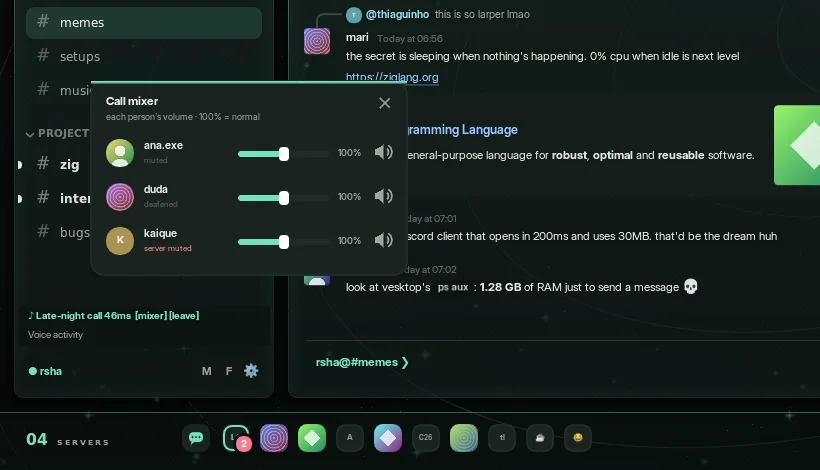
The panel also shows your ping, the connection quality by color and when you're transmitting, and it warns you if the microphone doesn't open or if the server muted or deafened you. Other people's mute and deafen show in the call list.
Channels where you lack the permission to connect are shown with a padlock, and the app doesn't try.
Settings → Voice
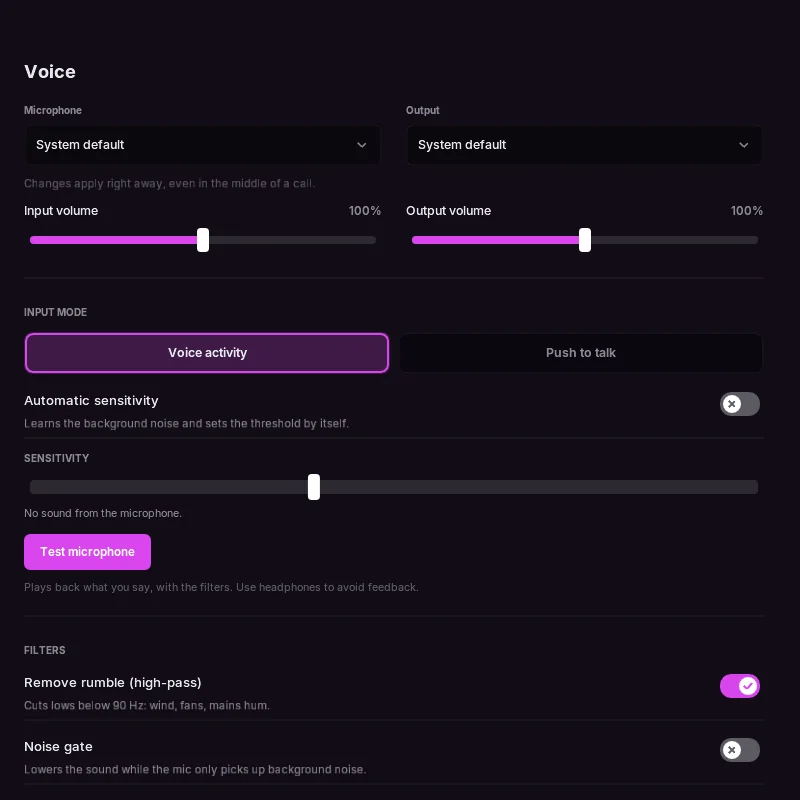
- Microphone and output: remembered by name, back to the default if they disappear, and you can switch in the middle of a call.
- Volumes, a live microphone level and Test microphone, which plays back what you say, with the filters on. Use headphones.
- Voice activity: an adjustable threshold on the meter, or Automatic sensitivity, which learns your background noise.
- Push to talk: a key or mouse button. It only works while the window is focused, and sending continues for a moment after you release, so the last word isn't cut.
- Filters: a high-pass that removes rumble below 90 Hz and a noise gate. Each one can be turned off.
- Noise suppression: Off or RNNoise, on by default and switchable mid-call. It runs on your computer, delays your mic by 20 ms and costs about 2% to 3.5% of a core on a 2011 Core i5 while the mic is open, and less on newer processors. Off, muted or with the push-to-talk key released, it costs nothing.
- Call sounds: short beeps when you join, leave, mute and unmute, which can be turned off.
How it works
| Layer | What it uses |
|---|---|
| Signaling | Voice gateway v8 over WebSocket, with heartbeat (seq_ack) and RESUME when the connection drops |
| Connection | IP discovery (74-byte packet) and Select Protocol over UDP |
| Transport encryption | RTP with aead_xchacha20_poly1305_rtpsize |
| End-to-end encryption | DAVE over MLS, through libdave and MLSpp |
| Codec | Opus at 48 kHz stereo, 20 ms per packet. Lost packets become Opus packet-loss concealment |
| Audio | SDL3 mixes. Each person is one SDL_AudioStream on the same output device, and their volume is the stream's gain. The microphone is a stream read every 20 ms |
A few details that took work to get right:
- The "speaking" opcode (op 5) goes out once when the session opens, and again on resume. It doesn't toggle on every sentence, since the server dropped the start of each one that way.
- The RTP clock keeps moving with real time while you're silent, so receivers don't drop your packets after a pause.
- Jitter margin applies only at the start of each talk spurt and inside a speaker's own pauses. Applying it whenever the queue emptied caused audible gaps.
- The RTP clock tells a speaker's pause from a late packet: the sequence number only moves with a packet, the clock always moves. A noise gate closing isn't a bad network.
- When a queue is about to run dry, Opus concealment fills in and fades to zero, so a stall never cuts mid-wave. Audio that doesn't continue from where it stopped starts from the last value played.
zig build voz-rederuns real Opus through simulated bad networks and compares the playback logic, counting gaps and clicks.LARPER_VOZ_FALApicks a speech file andLARPER_VOZ_WAVsaves the output to listen to.- People already in a call can arrive before DAVE exists, so they're kept and added when it starts.
Limits today
- Push-to-talk only works while the window is focused, because SDL has no portable global shortcut.
- Noise suppression targets steady noise. Typing and bangs may get through, and other voices stay.
- No screen sharing, camera or streaming.
- No automated test for a real call. QA covers the UI and the settings, with a fake audio device.
Debugging
LARPER_VOICE_DEBUG=1 larpercordThis prints opcodes, close codes and DAVE events, and microphone level and frames sent. It never prints the token or any keys.
To test only the connection, --voice-test joins a channel for 25 seconds, always muted:
LARPER_TOKEN=... larpercord --voice-test GUILD_ID CHANNEL_IDThe protocol follows Discord's voice documentation and the DAVE protocol documentation.