
Community mascots. Drawn in a file, worn in the app.
The Terminal mascot can wear anything: in Settings → Mascot → Customize you pick eyes, mouths, hats, accessories, ears and colors, and a mascot file can draw its own parts with shapes, one drawing per expression. These are files people made and sent to the repository. Download one, put it in your mascots folder and press Use on its card in the app. How to write one is in Writing mascots.
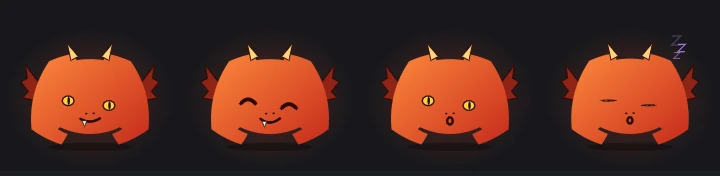
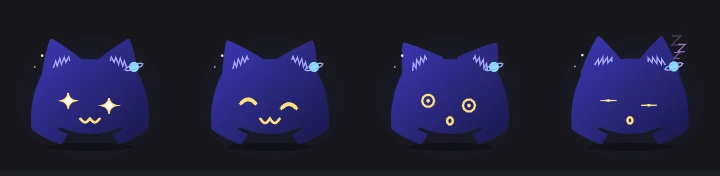

Each picture is the mascot drawn by the app itself, in four of its expressions: normal, happy, startled and asleep.
Send yours. One file, one pull request.
- Build a look in Settings → Mascot → Customize and press Save as file, or write the file by hand with Writing mascots. The app watches the folder: saving the file updates the mascot right away.
- Check it in the app: no error on its card under Mascot files, and every expression looks right in the big preview (the buttons under it switch the face, the headset and the tape).
- Fill in the
mascotnode: a name,author=,license=anddescription=. - Fork the repository, add the file to
mascots/community/and open a pull request. One mascot per pull request; a screenshot in the pull request helps.
- Data, not code. A mascot file only picks parts, colors and shapes. The app limits it to 64 KB, 256 shapes and 4096 points, and stops at the first problem with
file:line:column. - A name of its own and an original drawing: don't redraw someone else's character or logo.
- An open license.
license=written as its SPDX identifier (CC0-1.0,CC-BY-4.0,MIT…), so people know they may use and change it. - Only
.kdlfiles go in the folder. The picture on this page is made when the gallery is updated.